
Couple photo to anime
Convert a couple photo to anime with an editable prompt. Compare our tram-platform photo with the drawing, then upload one photo of the two of you and try the same look.
Quick facts
- What it does: converts one photo of two people into an anime-style portrait with clean ink lines, soft cel shading and warm colors.
- Input: a single existing couple photo — the current version edits one photo at a time and cannot merge two separate selfies into one image.
- Keeps: each person stays on their original side with their own facial features, hairstyle, expression and outfit.
- Cost: uploading is free; one credit is spent only when you press Generate. One free guest edit while daily spots last.
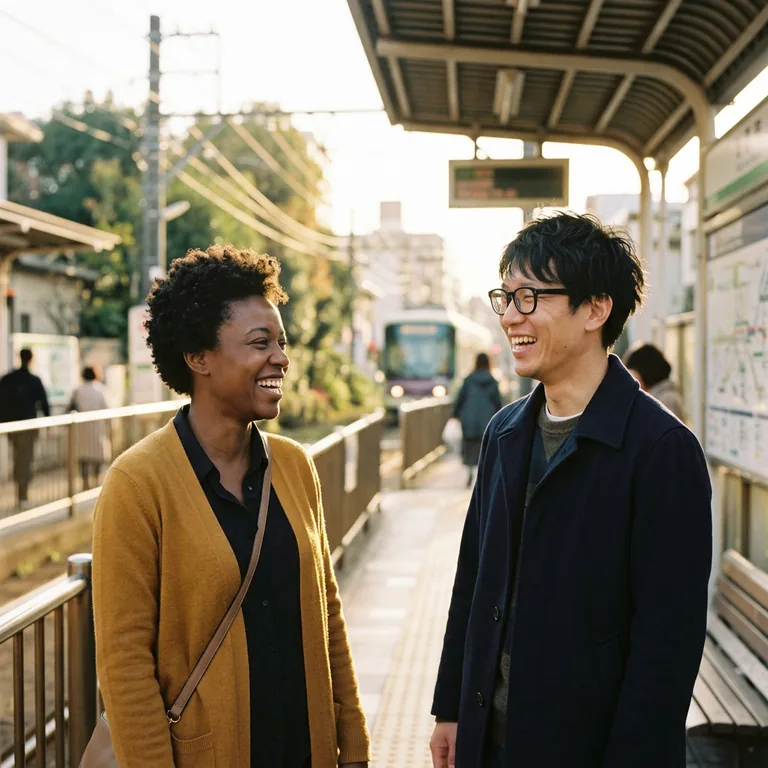 Original
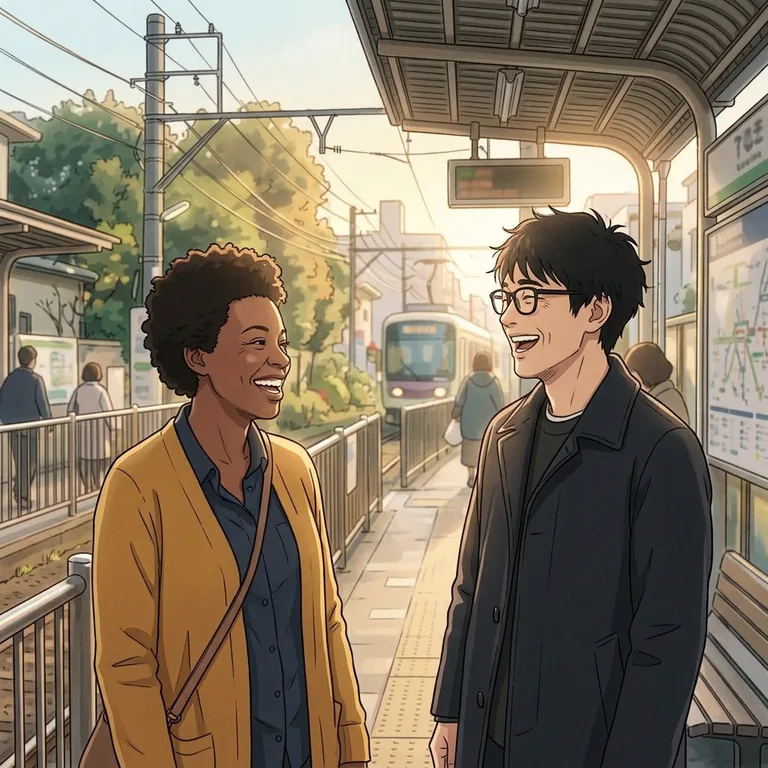 Result
Choosing and uploading a photo is free and uses no credits — one credit is used only when you press Generate in the editor. One free guest edit while daily spots are available.
See the exact prompt used
Turn our photo into an original hand-drawn anime scene with clean ink outlines, soft cel shading and warm afternoon colors. Keep both people on the same sides, their separate faces, glasses, hair, outfits, expressions and station setting.
The starting prompt for your photo (editable)
Draw the two people in this photo as an anime portrait with clean ink lines, soft cel shading and warm colors. Keep each person on their original side with their own facial features, hairstyle, expression and outfit. Keep their pose and the setting in my photo.
Choosing a couple photo to turn into anime
If you have several photos from the same day, zoom in on the smaller face in each one. Can you see the eyes, the outline of the jaw and where the hair meets the cheek? The shot where you can read both expressions is a better starting point than a scenic wide shot where you occupy a tiny corner. You can describe a busy background in fewer words than you can describe a face that is missing from the picture.
Look at the light on each person separately. In a sunset selfie, the sky may look beautiful while one face is almost a silhouette. In a restaurant, a colored lamp may light one cheek red. If you want an illustration with natural skin tones, choose a frame in softer light. If the colored light is part of the memory, keep the frame and mention that warm light in the prompt.
Leave room around the features you want to keep. Two people leaning together can work well when both sets of eyes and both hairlines are visible. In a forehead kiss or a hug from behind, one person’s face may be hidden. An instruction to show both faces would ask the model to invent the hidden part. Choose a more open pose, or ask to keep the original profile and let the gesture tell the story.
How to keep two people distinct
Write your directions from the viewer’s point of view. “Keep my glasses” makes sense to a friend, but the photo doesn’t say which person wrote the prompt. “Keep the round glasses on the person on the left” identifies the owner of the glasses. Give the person on the right a separate detail, such as a fringe, a striped collar or a particular expression. Use details that you can actually see.
Draw us in clean anime linework. On the left, keep the round glasses and the open smile. On the right, keep the short curls and striped collar. Keep our positions, the way our shoulders touch and the café window behind us.
This is a template for a café photo. To adapt the two-person anime prompt, replace the descriptions with two or three details from your own picture. Our tram-platform example uses the same idea: the prompt ties the people to their own features and outfits, and keeps the setting. For a beach photo, you can add a detail from your own setting to the editable prompt, such as the horizon or a striped umbrella.
Four ways to describe the drawing
The example at the top shows cel shading. Look under the chin and along the folds in a sleeve: the shadows form distinct shapes. To try that look, use “clean ink outlines, two tones of shadow and warm afternoon colors.” If your favorite detail is a very small one, such as a freckle or earring, name it in the same instruction.
For watercolor, try “soft washes of color, a little paper showing through the sky, and fine pencil lines around our eyes.” A loose wash suits a rainy street or a garden. If you want both people to stay easy to recognize, specify sharper edges around the faces and leave the loose brushwork for the coats, trees and buildings.
For flat vector, try “simple shapes, a small color palette and crisp outlines.” This is useful for a profile icon that will be seen at a small size. Decide which shapes identify each person when details disappear: a dark bob beside a high ponytail reads well at thumbnail size. The downloaded file is a PNG, even when the drawing has the look of vector art.
For pixel art, try “large square pixels, a limited palette and two distinct silhouettes.” Choose a photograph with contrasting outfits if the two people stand close together. Glasses may reduce to a line of pixels, so a jacket collar or a bright scarf can carry more of the resemblance. These three alternatives are prompt ideas; the published before-and-after pair demonstrates the cel-shaded version.
Check the result before you try another edit
Compare one person at a time. Start with the person on the left and check the expression, hair and glasses. Then do the same on the right. Finally check how the two figures meet: whose hand is on the shoulder, which arm is in front, and whether the pose still feels like the original moment. Zoom out once as well. A drawing can look convincing up close but crop one person out when used as an avatar.
If a detail moved between people, change the sentence that assigns that detail. For example, replace “keep our jackets” with “keep the denim jacket on the left and the green raincoat on the right.” If the faces are fine but the setting changed, identify one background feature you want back. Start the next attempt from the original photo, keep the parts of the instruction you liked and revise one thing. Generating another successful edit uses another credit.
Which editor fits the picture you want?
If you want an anniversary card with type, a border and a finished layout, you can take your illustration into a design editor such as Canva. If you would like to browse preset anime looks, Fotor describes its available styles. On this TuneImage page you start with a real two-person example and can rewrite the exact instruction. That’s useful when the important part of the picture is specific to you, like the matching wristbands from your first concert.
Frequently asked questions
Can I turn a couple photo into anime for free?
You can try one guest edit while daily spots are available. Signing in gives you up to four free edits in total, including that first guest edit. Choosing a file and editing the prompt use no credits. A successful generation uses one.
Can I use this on my phone without installing an app?
Yes. Tap Try this look below the comparison, choose a photo from your phone and review the preview. Confirm you have permission to use it, then upload and continue to the editor. You can still change the prompt before you press Generate.
Can I combine two separate selfies into one couple picture?
This converter takes one image. Choose a photo that already shows both of you so the pose, relative height, light and background are visible together. The example on this page began with one photo of two people.
Does the photo have to show both people looking at the camera?
A side profile can be the point of the picture. If one person is looking at the other, say which person is turned and ask to keep their gaze. Choose another frame if someone’s face is so hidden that you would need the model to invent their expression.
How do I keep glasses or a hairstyle on the right person?
Name the person by position in the image and describe one visible feature at a time. For example, write “person on the right: keep the round glasses and side part.” Check the preview for a mirrored selfie before you choose left or right.
Can I keep the pose but change the background?
Describe the replacement scene separately from the people. For a park portrait you might request a hand-painted garden behind the couple, then specify that their positions and joined hands should stay as shown. If a landmark matters more than the style, name it and ask to keep it.
Which crop works for a profile picture?
For a square avatar, choose 1:1 and leave space around both heads in the source. Some apps display a square image inside a circle, so check a small preview before posting. Pick Auto if preserving the original framing matters more than fitting a profile icon.
What kind of file can I upload and download?
Use a JPG, PNG or WebP up to 10 MB, at least 512 pixels on the shorter side and at most 20 megapixels. The result is one 1K PNG. Download it from the editor or from your private history while it is available.
How long are our photos available?
Use a photo you have permission to edit. TuneImage removes camera metadata from the upload and schedules the source for deletion after 24 hours. The result is available in private history for seven days. If you used a guest edit, return in the same browser to access it.